
cloud
Cloud Migration Strategy: How to Move Applications to AWS, Azure, or GCP
Most companies do not move to the cloud because everything is working well. They move because something starts slowing them down. Systems become harder to scale, infrastructure costs increase without clear visibility, or deployments take longer than they should.
That is where a cloud migration strategy becomes important. It is not just about moving applications to a new environment. It is about deciding how systems should work going forward.
Moving applications to platforms like Amazon Web Services, Microsoft Azure, or Google Cloud Platform can improve flexibility and performance. But if the approach is not planned properly, it can also create new problems instead of solving existing ones.
What is a Cloud Migration Strategy?
A cloud migration strategy is a structured plan that defines what should move to the cloud, how it should move, and what changes are required during the process. It helps teams avoid treating migration as a simple technical shift.
It is not just about moving applications
Many teams assume that moving applications as they are will automatically improve performance. In reality, this approach often carries existing issues into the cloud.
For example, a legacy application that is not optimized for scaling will behave the same way in the cloud. It may even become more expensive to run if resources are not managed properly.
Example: lift and shift vs improving the system
A company ABC moved its internal system to the cloud using a lift-and-shift approach. The migration was completed quickly, but the results were not as expected. Costs increased and performance remained inconsistent.
Another team working on a similar system chose to adjust parts of their architecture during migration. They moved databases to managed services and improved how workloads were distributed. This required more effort but led to better performance and lower long-term costs.
Why Businesses Move to the Cloud
Cloud migration is usually driven by operational pressure. Systems reach a point where they are difficult to manage efficiently.
Scaling becomes difficult
Traditional setups often struggle with sudden growth. Adding capacity takes time and planning, which limits how quickly systems can respond to demand.
Cloud platforms allow applications to scale based on usage. This helps maintain performance during high traffic without constant manual intervention.
Costs become unclear
Maintaining infrastructure can become expensive, especially when usage is uneven. Without proper tracking, it is difficult to understand where resources are being used.
Cloud environments provide more flexibility, but they also require active cost management. Without it, expenses can grow quickly.
Deployment slows down
As systems grow, releasing updates becomes more complex. Dependencies increase, and the risk of failure rises.
Cloud platforms support automated deployments and better version control, which helps teams release changes more confidently.
Key Cloud Migration Approaches
Choosing the right migration approach is one of the most important decisions in the process. Different systems require different strategies.
Rehosting (lift and shift)
This approach involves moving applications without making significant changes.
It works when:
- Migration needs to happen quickly
- Systems are stable
- Immediate results are required
However, it usually requires further optimization later.
Replatforming
This involves making small improvements while migrating.
Examples include:
- Moving to managed databases
- Adjusting configurations for better scaling
It provides a balance between speed and improvement.
Refactoring
This is a more detailed approach where applications are redesigned to fully use cloud capabilities.
It is suitable when:
- Long-term scalability is important
- Systems need performance improvements
- Existing architecture is limiting growth
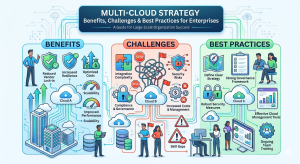
Challenges in Cloud Migration
Cloud migration often becomes complex because systems are interconnected and not always well-documented.
Dependencies create risks
Applications rely on multiple components such as APIs, databases, and internal services. During migration, these dependencies may behave differently or fail.
This can lead to issues that are difficult to identify immediately but affect system stability.
Downtime and disruption
Even planned migrations can cause temporary downtime. Without proper scheduling and testing, this can impact users and business operations.
Lack of visibility during migration
As systems move between environments, tracking performance becomes harder. Teams may see partial results or inconsistent behavior.
Platforms like itechops help by providing a clear view of incidents across systems. This allows teams to identify issues faster and respond more effectively during migration.
Security and compliance concerns
Cloud environments require different security configurations. If not handled correctly, misconfigurations can create risks that are not immediately visible.
Best Practices for a Successful Cloud Migration Strategy
A successful migration depends on planning and execution, not just tools.
Start with a clear assessment
Before migrating, teams need to understand:
- Current systems
- Dependencies
- Risks involved
Skipping this step often leads to unexpected issues later.
Prioritize what to migrate
Not all systems need to move at once. Starting with smaller or less critical applications helps teams learn and reduce risk.
Use a phased approach
Breaking migration into stages allows teams to monitor progress and make adjustments. This reduces the chances of large-scale failure.
Ensure monitoring and incident readiness
Migration introduces uncertainty. Systems may behave differently than expected.
Using centralized monitoring and incident management tools like itechops helps teams stay aware of issues and respond quickly.
Optimize after migration
Migration is not the final step. Once systems are in the cloud, they need to be reviewed and optimized for performance and cost.
Common Mistakes in Cloud Migration
Some mistakes appear repeatedly across different organizations.
Moving everything at once
Trying to migrate all systems together increases complexity and risk.
Assuming the cloud will fix problems
Existing architectural issues do not disappear in the cloud. They often become more visible.
Ignoring cost tracking
Without monitoring, cloud costs can increase quickly and become difficult to manage.
Not preparing teams
Cloud environments require different skills and workflows. Without training, teams struggle to manage new systems effectively.
Conclusion
A cloud migration strategy is not just about moving applications. It is about deciding how systems should perform, scale, and operate in the future.
When planned properly, migration can improve flexibility, performance, and efficiency. When rushed, it can introduce new challenges.
The difference lies in how well teams understand their systems, plan their approach, and manage what happens after the migration is complete.
FAQs
How long does a typical cloud migration take?
It depends on the complexity of the system. Smaller applications can be moved in weeks, while large, interconnected systems may take several months. Most delays come from dependencies, testing, and fixing issues that only appear during migration.
Can cloud migration be done without downtime?
In some cases, yes. Techniques like phased migration, replication, and blue-green deployments can reduce or avoid downtime. However, for complex systems, short disruptions are still common and need to be planned carefully.
Which cloud provider should you choose: AWS, Azure, or GCP?
There is no single best option. AWS is often chosen for flexibility and scale, Azure for enterprise integrations, and GCP for data and analytics. The right choice depends on existing systems, team expertise, and long-term goals.
Do all applications need to be migrated to the cloud?
No. Some applications may perform better or remain more cost-effective in their current environment. Migration decisions should be based on business needs, not the assumption that everything must move.
What is the biggest risk during cloud migration?
The biggest risk is not technical failure but poor planning. Missing dependencies, unclear ownership, and lack of visibility during migration can lead to delays and unexpected issues.
How do teams handle issues during migration?
Teams rely on monitoring and incident management to track system behavior in real time. Having a centralized view of alerts and issues helps identify problems early and reduces the impact on users.